
BeBackup Vault: the vault that keeps your BeBackup encryption keys, and checks that they are still in use
Version 1.03. Free, no registration. For Windows 64-bit, in French, English, German, Spanish and Italian.
Published by EDII-BeBackup — 48 rue Claude Balbastre, 34070 Montpellier, France.
Without its key, an encrypted backup cannot be read back
BeBackup encrypts your backups with a key known only to you. That is what protects them: neither a thief, nor a hosting provider, nor BeBackup itself can read them. It is also what makes them unrecoverable if the key is lost, and you find out on the day you need to restore.
A text file on a desktop, a sticky note, the memory of a technician who has left: that is where too many keys end up. BeBackup Vault gives them a safe place, and tells you, medium by medium, whether the key you are keeping really is the one encrypting the backup.
What BeBackup Vault does
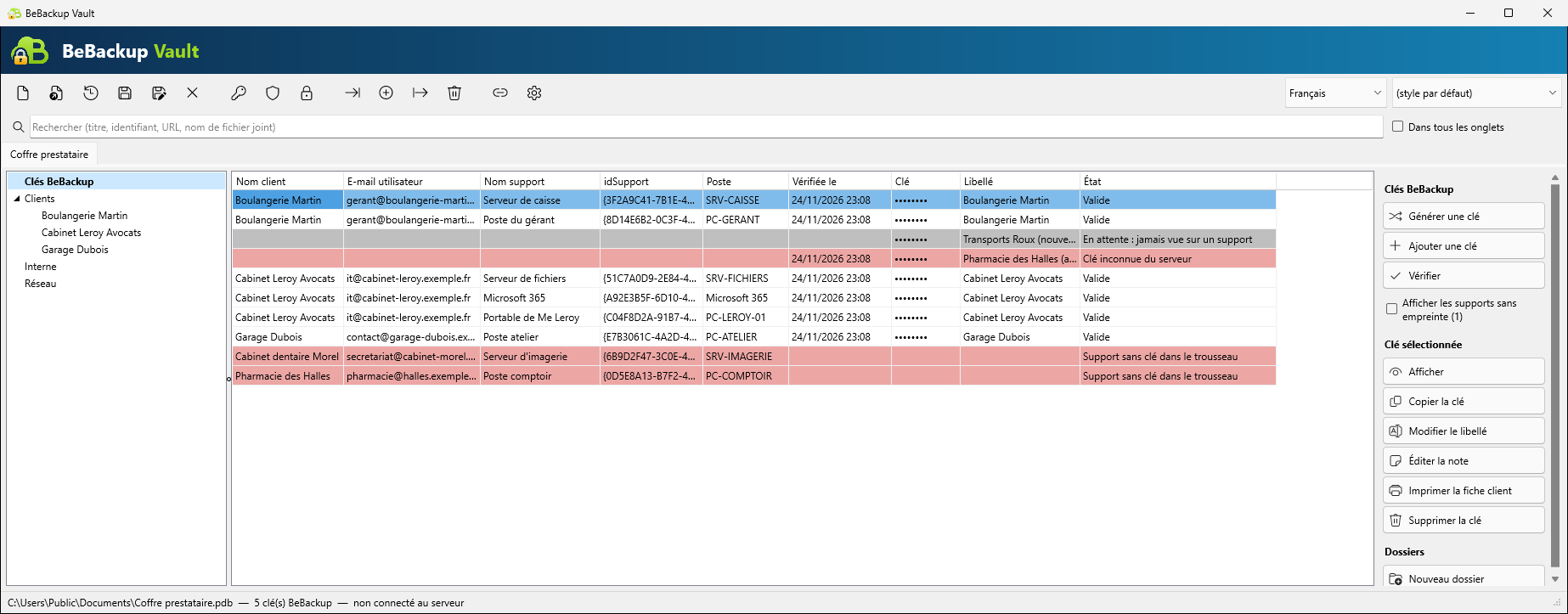
- It holds all your BeBackup keys, one line per backed-up medium: client name, medium, workstation. The day a client calls, the key is found in seconds.
- It checks with your BeBackup server which media use each key. A medium matching no key in the vault appears in red: that is a backup you would not be able to read back today, and you know it before disaster strikes.
- It generates strong keys: 41 characters, around 257 bits, with no ambiguous characters. And it spots weak keys chosen by hand.
- It prints the "Your BeBackup key" sheet to hand to the client, in their own language.
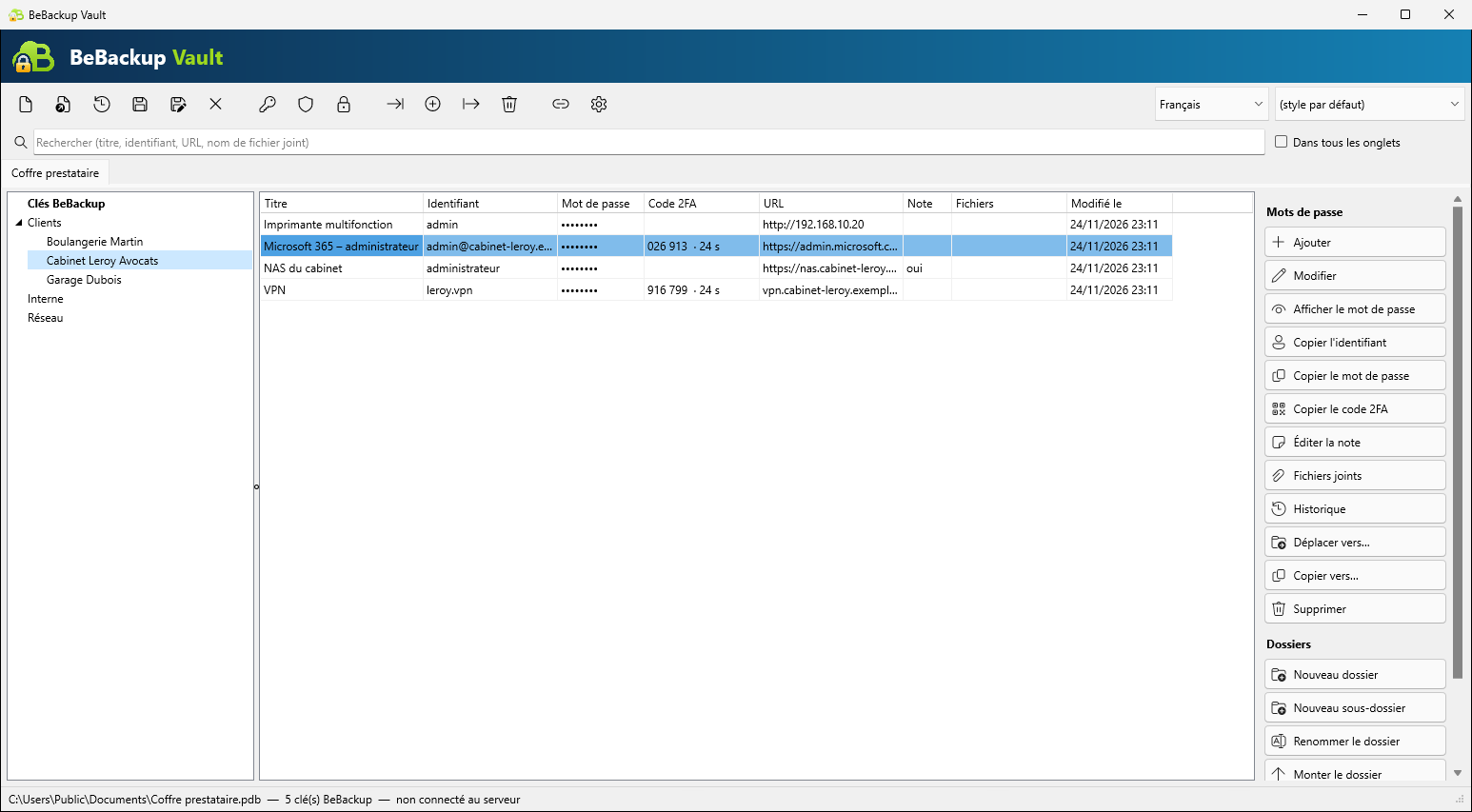
- It is also the team's password manager: folders, encrypted notes, two-factor authentication codes, small encrypted file attachments.
- Coming with version 7.41 of the BeBackup server: a padlock in the web interface, next to every medium whose key has been verified in the vault. You will see at a glance which clients are covered.
What it does not do
- No cloud synchronisation: to share a vault, place it on a network share.
- Key verification requires an account on a BeBackup server. Without an account, BeBackup Vault remains a password manager.
- Two-factor authentication codes: stored in the same vault as the password, they no longer constitute a separate factor. Reserve this use for shared accounts that must remain recoverable, and keep the second factor for your administration accounts on another device.
A sheet to hand over to the customer, for error-free dictation
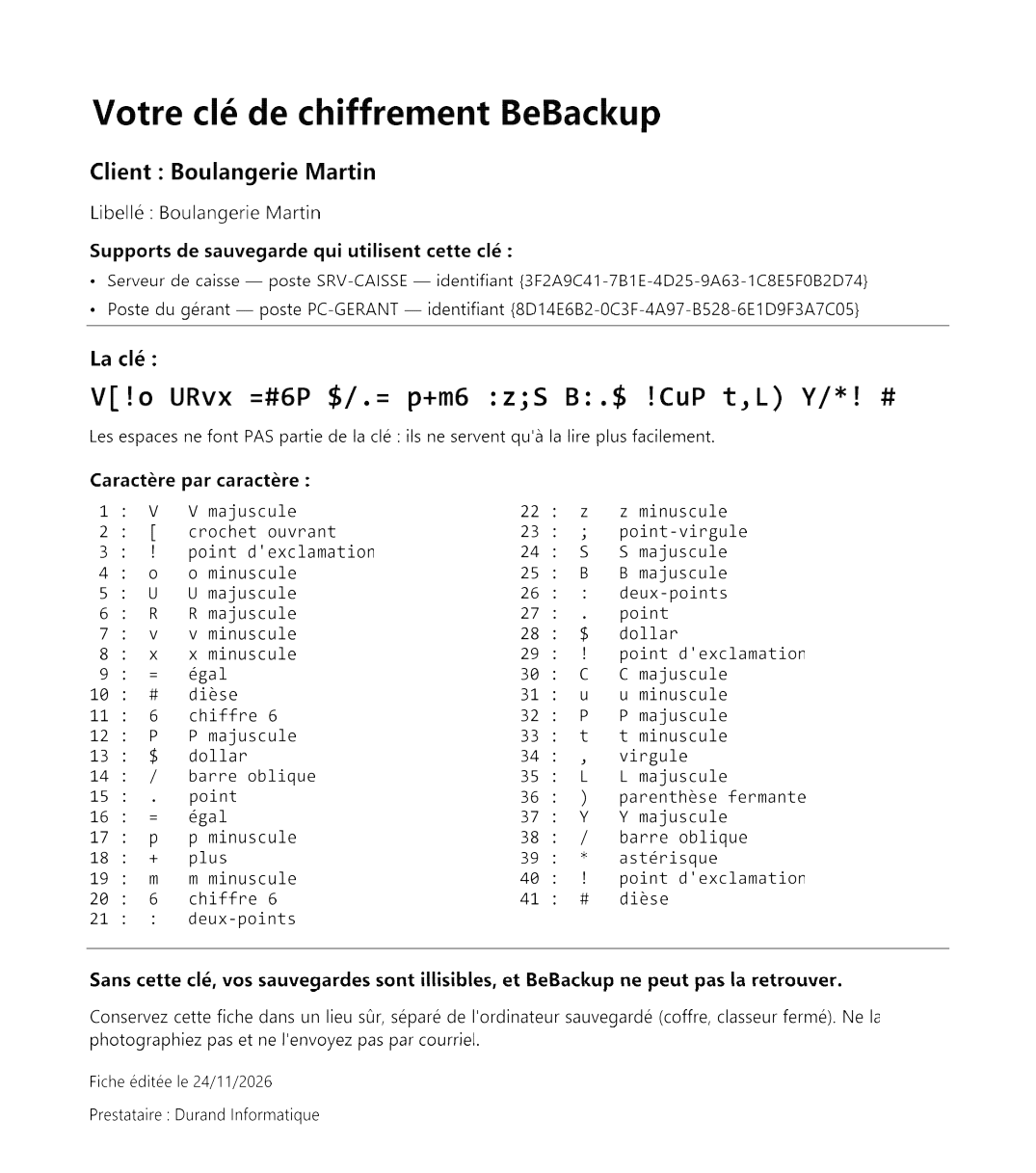
For each key, BeBackup Vault prints, or saves as PDF, the "Your BeBackup encryption key" sheet, in the customer's language: French, English, German, Spanish or Italian.
- The media protected by this key, with the workstation name.
- The key in groups of 4 characters, easier to read back.
- Every character spelled out ("23 : ; semicolon"): the key can be dictated over the phone without error, on the day a restore is needed.
Deliberately no QR code: a photo of the sheet would become a copy of the key, beyond any control.
A cloud-free password manager for the whole team
No BeBackup key to look after? BeBackup Vault is still a local password manager for Windows that depends on no online service whatsoever. Your passwords sit in an encrypted file, on your workstation or your file server: not with a provider, not in a cloud, with no subscription.
- Shared across the team on one of your company's network shares: everyone opens it with the master key and edits it. Every change is saved immediately, and the other workstations see it within seconds. If two technicians change the same entry, the most recent change is kept and the other remains in the history.
- Folders and sub-folders organised your way, a search across the whole vault, several vaults open in tabs.
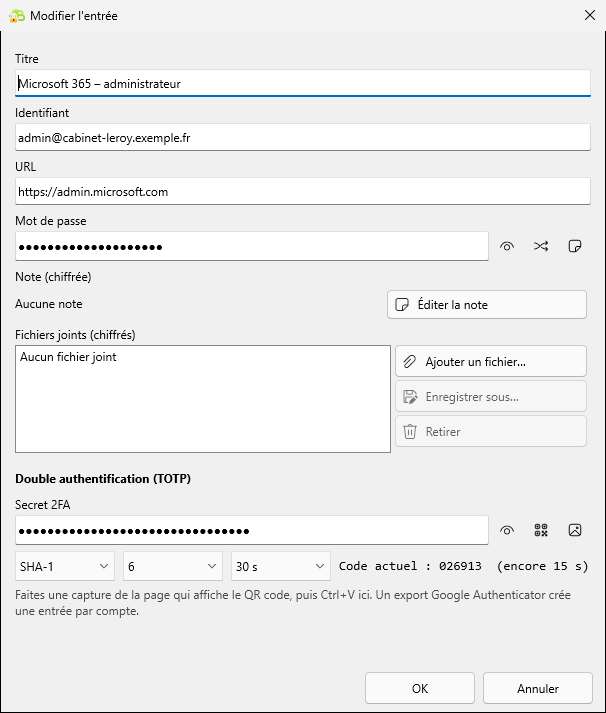
- Two-factor authentication (2FA) codes on your Windows PC, compatible with those of Google Authenticator and Microsoft Authenticator, with one-step import of the accounts from your phone.
- Encrypted notes and small file attachments (certificates, licence files), and the history of each password's previous values.
- A password generator and weak password checking, including, if you ask for it, a search of public breaches (Have I Been Pwned), without your password ever leaving the machine.
- CSV import and export, to migrate from another tool or move on to one.
What protects your secrets
- The vault is a file encrypted with AES-256-GCM, on your workstation or your network share. No third-party cloud. And since it is a file, BeBackup backs it up.
- The master key is strengthened with PBKDF2-HMAC-SHA512 (210,000 iterations minimum, around one second of computation per attempt): brute-forcing a master key becomes very costly.
- Your encryption key never leaves the machine: to verify it, BeBackup Vault sends the server only a fingerprint, from which it cannot be reconstructed.
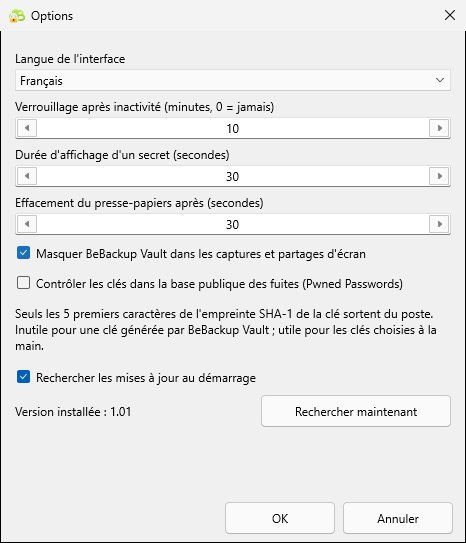
- Designed for remote support: the window does not appear in a screen share or in a remote-control tool; what you copy is cleared from the clipboard after 30 seconds; the vault locks itself when you step away.
- A recovery key lets you open the vault if the master key is forgotten. Create it: without it, nobody — BeBackup included — can reopen the vault.
- Updates are verified: a new version is offered at start-up, and is installed only after its EDII digital signature has been checked.
How to use it
- Download and run
bbVault.exe. It offers to install itself; it also runs without installation. - Create a vault and choose a master key: a passphrase of 5 or 6 randomly drawn words, or at least 14 characters. Create the recovery key immediately, and store it elsewhere.
- Connect the vault to your BeBackup server with your usual account.
- Add your keys, or generate new ones, then click Verify: each medium appears with its key, and those without one are flagged in red.
Technical sheet
| File | bbVault.exe 1.03, 22.9 MB, signed by EDII |
|---|---|
| Platform | Windows 64-bit. Proven on Windows 11; it should work on Windows 10 and Windows Server, although this has not been proven. |
| Encryption | AES-256-GCM; master key derived using PBKDF2-HMAC-SHA512 |
| Languages | French, English, German, Spanish, Italian |
| BeBackup server | Key verification: any server. Padlock in the web interface: version 7.41, forthcoming |
| Import / export | Import: CSV or another BeBackup Vault. Export: CSV |
| Attachments | 1 MB each at most |
| Updates | Offered at start-up, EDII signature checked before installation |
| Price | Free, no registration |
| Publisher | EDII-BeBackup, Montpellier (France) |
Frequently asked questions
Can BeBackup recover my encryption key if I lose it?
No. That is the guarantee encryption provides: nobody but you knows it, BeBackup included. That is precisely why BeBackup Vault exists.
Are my keys sent to the BeBackup server?
No. BeBackup Vault only sends a fingerprint of each key, which lets the server state which media use it without ever knowing the key itself. The key cannot be reconstructed from that fingerprint.
What if I forget the vault's master key?
With the recovery key, you reopen it. Without it, it is lost: nobody can open it. Create it as soon as you create the vault, and store it somewhere else.
Where is the vault stored?
In an encrypted file, wherever you decide: on your machine or on a network share. No third-party cloud. As it is a simple file, BeBackup can back it up.
Can several technicians use the same vault?
Yes, by placing it on a network share. Everyone can edit it at the same time: every change is saved immediately, and the other workstations see it within seconds. If two technicians change the same password, the most recent one is kept and the other remains in the history.
I have several BeBackup servers.
A single vault can connect to several BeBackup servers: such is the case for a hosting provider running several of them, or for a service provider that is a customer of several hosting providers.
Is it really free, even if I am not a BeBackup customer?
Yes, without registration. Key verification, however, requires an account on a BeBackup server.
How does it update itself?
On start-up, BeBackup Vault checks whether a new version is available and offers it to you. It installs it only after verifying its EDII digital signature. The check can be disabled in the options.
What's new
- 1.03 (25/11/2026) : Vault shared across the whole team: several technicians can edit it simultaneously on a network share, with each change saved immediately and visible to colleagues within seconds.
- 1.02 (24/11/2026) : First public release.
A tool built by the team behind BeBackup, the French secure backup solution. Discover BeBackup
Are your backups not yet encrypted? Free trial
Screenshots taken with demonstration data. Windows is a trademark of Microsoft. Google Authenticator is a trademark of Google.